
INNCOM gateways and floor bridges: how your guestrooms reach INNcontrol (and what to check when they don't)
Every hotel engineer knows the INNcontrol screen at the front desk, and most know the thermostat on the guestroom wall. Almost nobody thinks about the boxes in between — until a floor goes grey on the dashboard at 4 p.m. on a Friday. This guide covers those boxes: the edge routers and gateways that pull RF traffic out of the air, the RS-485 floor bridges that carry wired room networks to the server, how to read an outage pattern like a map, what you can safely check yourself, and where Authorized Service Integrator territory begins. It's written from field experience by Howe Sound Solutions, a Canadian Honeywell INNCOM ASI — and as with our e7 field guide, proprietary configuration depth stays with your INNCOM documentation or your ASI.
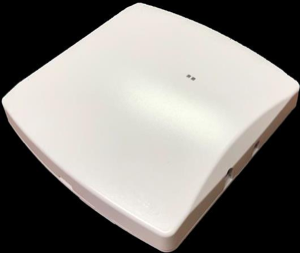
The backbone nobody sees
In each guestroom, the thermostat, door switch, motion sensor, and any lighting or drapery controllers talk over a short-range room network. One device — often the thermostat — acts as the room gateway: the single spokesperson that forwards the room's status upstream and receives commands back. From there, traffic takes one of two roads to the server.
The wireless road. On RF properties, room gateways join Honeywell's DeepMesh network — a 2.4 GHz mesh in which messages hop device to device until they reach an edge router wired into the hotel's Ethernet. The edge router is the on-ramp: it translates mesh RF traffic into IP packets bound for the INNcontrol server. The mesh is deliberately redundant — a message that can't take one path finds another — which is exactly why outage patterns are so diagnostic.
The wired road. Here, room gateways connect over RS-485 twisted-pair runs to a floor bridge — typically a slim rack-mount unit in a riser closet — which aggregates a few dozen rooms' traffic and forwards it over the hotel LAN to server software that manages every bridge on the property. The bridge doesn't think for the rooms, it carries them; if it can't reach the server, those rooms have no voice at all.
Many hotels run both roads at once; the triage logic below works for either.
Edge routers and gateways: the B574 / PC-803 class
The classic INNCOM edge router — the B574 family and its successors — is a small box, DIN-rail or wall/ceiling mounted, living in service corridors, closets, or above ceiling tiles. Each one anchors a segment of the DeepMesh network and can serve a substantial block of rooms; real-world capacity drops in RF-hostile buildings, which is why placement studies matter. Its cousin, the PC-803-class protocol converter, does the same Ethernet-to-RF job at room scale — a lower-power unit installed in or near a specific guestroom.
Two facts worth internalizing:
- These devices are network citizens. They pull an IP address, speak to server software over specific ports, and are exactly as healthy as the switch port, VLAN, and firewall path behind them. A huge share of "INNCOM outages" are actually IT changes — a re-patched switch, a new firewall rule, a subnet migration — severing the path to the server.
- Power is often PoE. A dead PoE switch, a swapped non-PoE switch, or an unplugged low-voltage supply takes the router down — and every room behind it.
Floor bridges: the B576 class
The B576-class RS-485 floor bridge is the wired counterpart: a 1U rack unit with two RS-485 ports, each serving a daisy-chained run of wired room gateways — commonly around thirty-five rooms per port, though real capacity depends on cable length, quality, and topology. It takes low-voltage DC power from its supplied adapter or PoE — one or the other, never both — and reports to management software on the INNCOM server over the IP network.
The front panel gives useful telemetry without opening anything:
- A status indicator reflecting whether the bridge is talking to the server — broadly, a slow patient blink means alive but not connected; a rapid flutter means the server link is up. A bridge blinking slowly in the rack is telling you the problem is network- or server-side, not guestroom wiring.
- An activity indicator that flickers when RS-485 traffic is actually moving on the room-facing ports. Traffic on one port but not the other localizes the fault to a single wiring run — half the floor talking, half silent.
Read those two lights together and you can split most floor-bridge problems into "upstream" (bridge to server) versus "downstream" (bridge to rooms) before touching a cable. Confirm the exact patterns for your hardware revision in your INNCOM documentation.
One more thing worth knowing exists, though it's ASI territory: floor bridges ship in more than one firmware personality, matched to the generation of room gateways wired to them. The wrong variant silently breaks a whole port — the classic trap when a bridge is swapped from spares, and why replacement is a configuration job, not just a hardware job.
Reading the outage pattern: one room, a cluster, a floor
Before touching hardware, pull up the INNcontrol offline list and ask what shape the outage has — the pattern is your best diagnostic instrument.
One room offline
Almost always in-room: thermostat power, a mis-addressed replacement device, the room gateway itself, or — on wired properties — that room's RS-485 drop. Work the room first; our e7 field guide walks the in-room triage in detail. Don't climb into the riser closet until the room is exonerated.
A cluster of rooms offline
A contiguous cluster — adjacent rooms, or one wing of one floor — points at shared infrastructure serving exactly that zone. On RF properties, suspect the edge router or protocol converter anchoring the area: power, Ethernet link, PoE. On wired properties, a cluster mapping to one RS-485 run points at that run — a damaged cable, a failed device mid-chain dragging down the bus, or one port's wiring at the bridge. The activity light on that bridge port is your first witness.
A scattered cluster — random rooms across several floors — smells instead like RF interference, a server-side issue, or duplicated addressing after sloppy swaps, not a single dead box.
A whole floor (or several) offline
Now you're upstream of the rooms entirely. In rough order of likelihood:
- The floor bridge or edge router lost power — closet outlet, tripped breaker, failed PoE switch.
- The network path broke — switch port down, patch cable pulled during other work, VLAN or firewall change.
- The server side stopped listening — management software not running, a server NIC change re-routing traffic, or a firewall now blocking the port the bridges use.
That last one deserves emphasis: if every bridge drops at once — classically right after IT work such as server maintenance, a new firewall, or a second network card in the server — the problem is virtually never in the closets. Coordinate IT and your ASI rather than rebooting closets floor by floor hoping.
Safe first checks any engineer can do
None of this requires configuration access, and none of it can make things worse:
- Power. Is the unit lit at all? Check the outlet, low-voltage adapter, breaker, and — for PoE-fed devices — the feeding switch. After any electrical work or generator test, walk the closets.
- Indicator lights. Photograph what the status and activity indicators are doing before power-cycling anything — the pre-reboot pattern is diagnostic gold.
- Cabling. Ethernet seated at both ends? Link light at the switch? RS-485 terminals seated and undamaged? Look for evidence of other trades — new cabling in the closet, a re-dressed patch panel, water staining.
- The switch port. Confirm with IT that the port is up, in the right VLAN, and (if PoE) delivering power. Ask specifically: "has anything changed on this network segment recently?"
- One controlled power cycle. If power and cabling check out and the device is wedged, a single power cycle is reasonable. If it doesn't recover cleanly, stop — repeated blind reboots destroy diagnostic state and fix nothing.
- Scope confirmation. Re-check the INNcontrol offline list after each action.
What not to touch without documentation
Bright lines, learned the hard way:
- Addressing, RF channel, and network identity settings. Room IDs, channels, segment assignments, and IP configuration were engineered as a set. Changing one device by guesswork creates cross-talk and phantom rooms far harder to find than the original fault.
- Firmware and software loads. Bridges and routers run specific versions matched to the room devices behind them and the server software in front of them. Loading "whatever the spare had" is how one offline floor becomes two.
- Server script and configuration files. The files defining which bridges exist and how traffic routes are precise and unforgiving — ASI or Honeywell-guided territory.
- Dual-powering a floor bridge. Never connect the DC supply and PoE simultaneously, and respect the supplied adapter's grounding requirements — improper power arrangements can damage the bridge and the room devices wired to it.
- Swapping hardware "like for like." A physically identical replacement is not a configured replacement; swaps need commissioning against the server, staged with your ASI.
For all of the above: consult your INNCOM documentation or an Authorized Service Integrator.
Planning, renovations, and the RF environment
Backbone problems are often built in years before they surface:
- Placement. Edge routers belong where they can hear their rooms — coverage studies during design beat guesswork forever after. A router relocated "temporarily" during a refresh and never moved back is a recurring find on service calls.
- Renovations change the RF map. Metal-backed headboards, mirrored feature walls, metal fire doors — all of it attenuates and reflects 2.4 GHz. Re-verify RF health in renovated zones before handing rooms back.
- Wi-Fi coexistence. DeepMesh shares the 2.4 GHz band with guest Wi-Fi, so an AP refresh or channel-plan change can degrade a previously stable mesh. Put the INNCOM network on the checklist for every wireless project.
- Closet hygiene. Label bridge ports against room ranges, mark router locations on floor plans, keep as-builts current. An hour of labelling saves a night of tracing.
When to escalate to an ASI
Call an Authorized Service Integrator when the fault survives your safe checks; when the fix requires configuration, addressing, firmware, or server-side changes; when hardware needs replacing and commissioning; when outages are property-wide or follow an IT change you can't unwind; or when the same zone keeps flapping and you suspect design rather than a broken part. Come with the outage pattern, photos of the indicator lights, recent changes, and your as-builts — it will meaningfully shorten the engagement.
FAQ
What's the difference between an INNCOM edge router and a floor bridge? An edge router (B574/PC-803 class) connects the wireless DeepMesh RF network to the hotel's Ethernet; a floor bridge (B576 class) connects wired RS-485 room-gateway runs. Both hand traffic to the INNcontrol server; many properties run both.
A whole floor shows offline in INNcontrol. Is every thermostat broken? Almost certainly not — thermostats keep controlling their rooms locally while offline. A whole-floor outage points at the shared device serving that floor, its power, its switch port, or the path to the server.
Can I just reboot the INNCOM floor bridge? One controlled power cycle after checking power and cabling is reasonable — photograph the indicator lights first. If it doesn't recover, stop and escalate; repeated reboots erase the evidence an ASI needs.
Why did rooms go offline after our Wi-Fi upgrade? INNCOM's mesh shares the 2.4 GHz band with Wi-Fi, so new access points or channel changes can destabilize a previously healthy mesh. The fix is deliberate channel coordination — an ASI can adjust the INNCOM side.
Who can replace or reconfigure INNCOM gateways and bridges in Canada? Honeywell INNCOM network infrastructure is serviced through Authorized Service Integrators. Replacement isn't plug-and-play — new hardware must be commissioned against the server — so plan swaps with an ASI.
Talk to Howe Sound Solutions
Howe Sound Solutions is a Canadian Honeywell INNCOM Authorized Service Integrator. Our technicians diagnose and service the full backbone — edge routers, protocol converters, floor bridges, RS-485 runs, and the server side — plus the in-room devices behind them, Canada-wide. If a floor is dark on your INNcontrol screen, if outages followed a renovation or network change, or if you want the backbone audited before it fails on a sold-out weekend, contact Howe Sound Solutions and we'll get an INNCOM-trained technician on it.
Related: INNCOM service in Canada · parts catalogue · customer platform · contact us