
The INNCOM e7 thermostat field guide: pairing, PIR, and offline rooms — for hotel engineers
If your property runs Honeywell INNCOM, the e7 thermostat is probably the device your front desk complains about most and understands least. It's a solid platform — but it's not a home thermostat, and treating it like one is how engineers end up chasing ghosts. This guide covers what the e7 actually does in the room, the five complaints you'll field, how the occupancy logic really works, and how to triage a room that drops offline — written from field experience, not from the manual. For the proprietary depth (parameter tables, binding procedures, engINN configuration), lean on your INNCOM documentation or an Authorized Service Integrator.
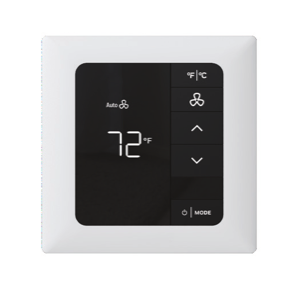
Where the e7 sits in the guestroom ecosystem
Think of the e7 as the room's brain, not just a temperature dial. It switches the fan coil, PTAC, or heat pump directly through onboard relays, and it carries a Zigbee-based radio that ties it into the rest of the room: door switch, balcony contact, external motion sensors, lighting and drapery controllers, even the door lock on integrated properties.
On networked sites, in-room devices talk to each other over RF, one device acts as the room gateway, and traffic rides Honeywell's DeepMesh wireless network — hopping thermostat to thermostat — back to an edge router, then to the INNcontrol server your front-office staff sees. That chain matters: when a room "goes offline," the fault can live at any link, and the fix is different at each one. We'll come back to that.
The other thing to internalize: the e7 doesn't just follow the guest's setpoint. It follows the guest's setpoint *within rules* — occupancy state, rented status from the PMS, open-door exposure, and property-configured limits. Most "broken thermostat" calls are actually those rules doing exactly what someone configured them to do.
The five complaints engineers actually get
1. "The room is too hot / too cold"
Before touching the thermostat, check the mechanical side: is there chilled or hot water actually in the pipe? On two-pipe buildings in shoulder season, the e7 gets blamed daily for a changeover problem it can't fix. If the plant is fine, verify the thermostat isn't reading a false temperature — a stat mounted in the discharge airstream, behind an open bathroom door, or in afternoon sun will satisfy itself while the bed area stays uncomfortable. Placement problems are permanent problems; flag them for your ASI rather than fighting them room by room.
2. "It won't hold the setpoint"
This is the energy-management system working, ninety percent of the time. When the room reads unoccupied, the e7 relaxes control by a configured setback band around the guest's setpoint; when occupancy returns, it recovers. Guests perceive this as "the thermostat keeps changing itself." First response: confirm the door switch and motion detection are healthy (a stuck door contact or blocked PIR will make an *occupied* room look empty), then check whether the setback and timeout values suit the property. If a VIP guest is involved, the e7 supports a limited-energy-management mode that widens the limits and ignores occupancy for a set period — your documentation covers how to invoke it.
3. "The display is blank or showing something weird"
A dim or blank display is often normal: the e7 deliberately drops to a dim, minimal display when nobody has touched it and wakes as you approach. Educate housekeeping before replacing hardware. Short letter codes on the screen are status or alert messages, not gibberish — a wall-plate alert means the stat isn't seated properly on its smart wall plate; dashes with a door icon mean an entry or balcony door is reporting open; on battery-powered e7w units, a battery icon means exactly what you think. If the display is truly dead, check power at the wall plate before condemning the unit.
4. "The room shows offline at the front desk"
Don't start at the thermostat. Start by asking: one room, a cluster, or a whole floor? A single offline room is usually in-room (power, configuration, room gateway). A cluster or floor points upstream at an edge router or bridge. Full triage below.
5. "A guest says the motion sensor spies on them / the AC shuts off while they sleep"
The PIR complaint is famous — travel forums have run threads on defeating hotel thermostat motion sensors for over a decade. Two honest answers: the sensor detects motion only, nothing more; and a properly configured system should *not* set back on a sleeping guest, because the logic is smarter than a bare motion timer. If it's happening anyway, the room's occupancy inputs or timers need attention — that's a real defect, not a guest being fussy.
PIR and occupancy logic, explained honestly
Here's the model worth teaching your whole team. The e7 combines the entry-door switch with motion sensing: when the door closes and motion follows, the room is occupied. When the door opens and closes and *no* motion follows, the room is presumed empty and setback begins after a short timeout.
The PIR alone doesn't decide anything instantly. Motion-only timeouts run for hours, and the logic distinguishes daytime from overnight periods precisely so a motionless sleeper doesn't get cooked at 3 a.m. Rented status from the PMS adds another layer — a rented-but-empty room is treated more gently than an unsold one.
What's tunable (via INNCOM's configuration tools, through your ASI): setback depth, occupancy timeouts, guest-selectable setpoint limits, open-door exposure behavior, and fan behavior when satisfied. What's not negotiable: a door switch that never reports, or a PIR that can't see the room. If the stat is tucked in an alcove or behind a luggage rack, no parameter tuning saves you — fix sightlines or add an external motion sensor.
Quick health check any engineer can do: the e7 has a built-in service mode with self-tests that count motion pulses and door transitions live at the display. Walk the room during a PIR test; if the count doesn't climb, the sensor or its view is the problem. The exact key sequences are in your INNCOM documentation.
Offline rooms: thermostat vs RF vs floor network
Triage in this order:
The thermostat itself. Does it have power and a live display? Is it controlling HVAC locally? An e7 will happily run the room standalone while offline to the server — which tells you the failure is communications, not control. On e7w battery models, dead or low AA cells are the first suspect, full stop.
The room's RF identity. Every room needs a correct and unique Room ID, and the right RF channel and PAN settings for its network segment. A stat swapped in from stores with stale settings will either vanish or — worse — cross-talk with another room. (The smart wall plate is your friend here: it holds the room's configuration and hands it to a replacement stat.) The onboard WAN test confirms the whole path — if the server answers with the correct room number scrolling across the display, the chain is good end-to-end.
The room gateway. In each room one device forwards traffic upstream. If that device is unpowered or misconfigured, everything in the room looks offline even though every device is healthy.
The floor network. Multiple rooms down in one area means look at the edge router or floor bridge serving that zone — power, network drop, switch port. DeepMesh is self-healing and multi-path, so isolated single-hop RF weakness rarely takes rooms fully offline; concentrated outages are almost always infrastructure.
Also worth checking before you escalate: new sources of 2.4 GHz interference (fresh Wi-Fi access points on overlapping channels) and any renovation work that added metal, mirrors, or moved devices.
Maintenance habits that prevent calls
- Walk a sample of rooms quarterly and run the PIR, door, and WAN self-tests. Ten minutes a floor.
- Batteries on a schedule for e7w units and wireless door/motion sensors — don't wait for the low-battery flood.
- Review the offline-rooms list in INNcontrol weekly; a room that flaps daily is telling you something.
- Keep spare stats *unconfigured* and rely on the wall plate to program replacements; hand-set spares cause cross-talk tickets.
- Log every setpoint-related guest complaint with a room number. Patterns reveal bad placement or a mis-set zone faster than any diagnostic.
- After renovations, re-verify RF health in affected zones before handing rooms back.
What to have ready before calling for service
Have this at hand and you'll cut the call short: property name and system type (INNcontrol version, wired or wireless), affected room numbers and whether they're isolated or clustered, what the display shows (photo of any code), what self-tests you've run and their results, recent changes (renovation, Wi-Fi work, power events, PMS changes), and the HVAC type in the affected rooms. If a parameter change is on the table, know who holds your property's configuration records.
When you need hands on site
Howe Sound Solutions is a Canadian Honeywell INNCOM Authorized Service Integrator. Our trained INNCOM technicians handle e-series thermostat service, RF network diagnostics, commissioning, and configuration changes Canada-wide — and we quote parts before we order them, so there are no surprises on the invoice. If a floor is offline or the setback complaints won't stop, contact Howe Sound Solutions and we'll get a technician on it.
FAQ
Why does my hotel room thermostat keep resetting itself?
It isn't resetting — the energy-management system relaxes the setpoint when the room reads unoccupied and restores it when you return. If it happens while the room is occupied, the door switch or motion sensor needs service.
Can the INNCOM e7 motion sensor be turned off?
The occupancy behavior is configurable at the property level, and a per-room VIP mode can bypass setbacks temporarily. Disabling PIR outright defeats the energy program — talk to your ASI about tuning timeouts instead.
What does it mean when an INNCOM room shows offline?
The server can't reach the room's gateway. The thermostat usually still controls HVAC locally. Check thermostat power, room addressing, the room gateway device, and the floor's edge router, in that order.
Does the e7 thermostat work without the network?
Yes. The e7 runs full standalone energy management using its onboard motion sensor and a wired door switch. The network adds central monitoring, PMS integration, and remote control.
Who services INNCOM thermostats in Canada?
Honeywell INNCOM systems are serviced through Authorized Service Integrators. Howe Sound Solutions provides INNCOM-trained technicians Canada-wide, with quote-first parts sourcing.
Trained INNCOM technicians, Canada-wide, with quote-first parts.
Book a site assessmentRelated: e7 thermostat support · parts catalogue · customer platform · contact us