
INNCOM Evora switches: the guestroom control line explained — selection, installation basics, and troubleshooting
In an INNCOM guestroom the thermostat gets the attention, but what guests actually touch most are the switches. On current Honeywell INNCOM properties that usually means Evora: the tactile-keypad family running lighting scenes, drapes, privacy annunciation, and the doorbell from wall plates that look like they belong in a hotel room, not a control panel. This guide covers what Evora is, where it sits against MODEVA and ELEMENTS, what each switch does in the room, how to choose and plan for them, and how to read the field complaints they generate — written for the engineer who inherits these rooms and the owner specifying them, by Howe Sound Solutions, a Canadian Honeywell INNCOM Authorized Service Integrator. Proprietary depth (device programming, scene configuration, commissioning) belongs with your INNCOM documentation or your ASI.
What Evora is, and where it sits in the INNCOM lineup
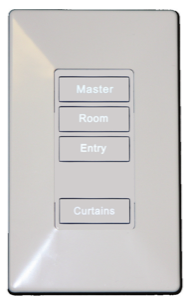
Evora is INNCOM's flagship family of guestroom switches — physical, momentary-press keys with a crisp tactile click, backlit legends, and optional status LEDs. A station can carry one button or a full keypad, and each key can be programmed to do essentially anything the room automation system supports: toggle or dim a light, fire a welcome or goodnight scene, drive the drapes, or set Do Not Disturb.
Two design decisions define the family. First, Evora separates the user interface from the load assembly behind it — the same modular architecture INNCOM uses for its premium MODEVA line. The faceplate is what the guest sees; the module behind it switches or dims the circuit, or simply reports button presses to the room network. Second, unlike MODEVA, Evora mounts on standard-dimension brackets and takes ordinary Decora-style cover plates, so it gangs alongside conventional devices and slots into rooms built around North American electrical hardware.
Where does it sit? MODEVA is the premium capacitive-touch line — beautiful, highly customizable, priced and mounted accordingly. ELEMENTS is the newer designed family spanning comfort, lighting, and drape controls with its own aesthetic. Evora is the workhorse flagship in between: contemporary looks, real buttons every guest instinctively understands, and mounting conventions your electrician already knows. For the full tier map of INNCOM's product families, see our INNCOM product lines explained guide.
The jobs Evora does in the guestroom
The same hardware shows up in several roles, distinguished by programming and engraving.
The entry switch
Just inside the door, the entry station carries the room's "big" keys: a master or all-on/all-off, an entry light, and often a welcome scene lighting a path into the room. Tied to the door switch, it helps the occupancy logic greet an arriving guest and shut the room down after departure.
Bedside
Bedside stations are about reach-without-thinking: a goodnight key that drops the whole room dark, a reading-light dimmer, drape and sheer keys, and frequently the privacy keys. A quick press toggles a light; press-and-hold ramps the dimmer. Guests figure this out without instructions, which is the point of a tactile keypad.
Bathroom and nightlight
Evora includes a dedicated nightlight configuration — a soft illuminated panel with a couple of keys — commonly placed near the bathroom so a 3 a.m. walk doesn't require full room lighting. A small touch that shows up in guest-comfort scores.
Privacy, the doorbell, and the corridor
This is the interplay engineers ask about most. Inside the room, Evora keys set Do Not Disturb or Make Up Room. Outside the door, a corridor annunciator — the DS12 is the typical INNCOM piece — shows that privacy state to housekeeping and carries the doorbell button. Inside, the CHM-S chime module sounds the bell. The room logic ties it together: with DND active, the bell stays silent and the corridor display tells staff not to knock. When a guest says "housekeeping knocked while my DND was on," you're troubleshooting that chain — in-room key, room controller's privacy state, annunciator, chime — not a single device.
How a switch joins the room network
Evora stations aren't standalone dimmers; they're nodes in INNCOM's Integrated Room Automation System, communicating either over the wired S5bus — INNCOM's in-room low-voltage bus — or wirelessly over the same 2.4 GHz 802.15.4-based RF network the rest of the room uses. Networked rooms then ride Honeywell's DeepMesh backbone to the INNcontrol server, the same path your thermostats use.
That means the thermostat and the switches are teammates. The thermostat anchors the room's occupancy and energy logic; the switches feed it (Evora carries a door-switch input for exactly this reason) and act on it — welcome scenes on arrival, load shedding on checkout, drapes participating in energy strategy. It also means a "switch problem" can really be a room-network problem — the same lesson we cover from the thermostat side in the INNCOM e7 field guide. A room whose gateway is down can have every switch working locally while nothing reports centrally.
Choosing Evora for your property
Match the interface to the room design
Start with what the guest should be able to do from each location, then count keys. Evora keypads run up to seven keys across five key positions, and a multifunction key can group several features on one button where wall space is tight. Resist putting every function everywhere — a five-key bedside station that does the right five things beats a crowded panel nobody reads. Standard device colors are white and black, with Decora plates in a wider palette (including almond tones), and third-party Decora plates fit if the design brief calls for something else.
Engraving and customization
Keys can ship blank, or engraved with text, icons, or even a property logo, with backlit legends that read at night. Optional status LEDs confirm state — invaluable for privacy keys, where the guest needs to see that DND is on. Plan engraving early and in the property's service languages; re-ordering key caps after opening is an avoidable headache. Evora stations come factory assembled to your configuration, so the ordering spec is where design intent gets locked in — a place your ASI earns their keep.
Retrofit versus new build
Evora's standard mounting and Decora compatibility make it one of the friendlier automation lines to retrofit: it fits standard single-, double-, and triple-gang North American boxes, and the wireless option means an existing room can often gain scene control without new control wiring. New builds have more freedom — wired S5bus throughout, load centers with low-voltage adapters, drape motors roughed in — and it's worth taking, because wired rooms are the quietest to support long-term. Either way, the honest first step is a room survey: what's in the walls decides more than the catalog does.
Installation planning, at a concept level
This isn't a wiring guide — installation belongs with qualified electricians working from current INNCOM documentation — but owners and engineers should know the shape of the job.
Every Evora station needs a backbox, and the load assembly behind the faceplate determines what that box must contain. Some assemblies switch or dim line-voltage lighting circuits directly — relay actuators for on/off loads, and two dimmer technologies (TRIAC and FET) matched to the lamp type, each with its own load rating. Others are low-voltage: a power-supply module, or a low-voltage adapter used where switching happens remotely at a load center and the wall station is purely an interface. That line-versus-low-voltage split drives everything downstream — box fill, conductor routing, which trade does the work, and how inspection goes.
Two planning notes that save change orders: dimmer ratings derate when multiple dimmers share a multi-gang box (heat is the enemy), so size stations against the current datasheet, not single-device numbers; and lamp compatibility matters — LED retrofits behind a dimmer chosen for the original lamps are a classic source of flicker complaints. Verify counts, load types, and box layouts with your ASI before rough-in.
When a switch misbehaves: reading the symptoms
The switch does nothing
First question: does anything in the room respond? A single dead station with the rest of the room healthy points at that station — module power, a failed keypad, or configuration wiped or wrong after a swap. If the whole room is unresponsive, stop blaming the switch: check room power, the gateway device, and the room's state at INNcontrol. And know which kind of key you're staring at — one that controls its own load directly can keep working while the network is down; an interface-only key can't. That distinction changes the diagnosis.
Backlight or indicator issues
Dim or dark key backlighting on one station is usually local — module power or the station itself. An LED showing the wrong state (a DND indicator lit when privacy is off) is a state-sync symptom, not a lamp problem: the station and room controller disagree, which points at communications or configuration. Log which keys and which rooms; patterns matter.
A scene doesn't fire — or fires halfway
Scenes are choreography: one key press, several devices acting. If a goodnight scene kills the lights but the drapes stay open, the key and the scene logic worked — the drape controller didn't answer. Chase the device that missed its cue, not the switch. If the scene does nothing from one station but works from another, suspect that station's programming or comms. This is where room-network context is everything: an RF room with new interference, or a wired room with a bus fault, produces "flaky scene" tickets no amount of switch-swapping fixes.
Privacy and doorbell oddities
Chime rings during DND, corridor display disagrees with the in-room key, doorbell dead: treat these as chain problems across the in-room station, room controller, DS12, and CHM-S. Test each link locally first, then the state passing between them.
When to call an ASI
Call an Authorized Service Integrator when the fix requires programming — scene changes, key remapping, privacy logic, stations that must be configured into the room — or when symptoms are network-shaped: clusters of rooms, state-sync weirdness, RF trouble after renovations. INNCOM programming and commissioning use proprietary tools, and guessing is how a one-room ticket becomes a one-floor ticket. Before you call, write down room numbers, symptoms per station, what works locally versus centrally, and recent changes (renovation, Wi-Fi work, lamp retrofits) — it shortens everything.
FAQ
What is the INNCOM Evora switch? Evora is Honeywell INNCOM's flagship family of guestroom keypad switches — tactile backlit keys controlling lighting, scenes, drapes, and Do Not Disturb / Make Up Room annunciation, networked into INNCOM's room automation system alongside the thermostat.
What's the difference between Evora and MODEVA? MODEVA is the premium capacitive-touch line; Evora uses physical keys, standard mounting brackets, and Decora-style plates, so it gangs with conventional devices and suits more budgets and retrofits. They share the same load-module architecture.
Can Evora switches be installed in an existing hotel? Usually, yes. Evora fits standard North American gang boxes and offers wireless communication, making retrofits practical without new control wiring. A room survey should confirm loads, box space, and lamp compatibility first.
Why is my Evora switch not working? Isolate it: one dead station points at local power, hardware, or configuration; a whole unresponsive room points at room power or the network gateway; a scene that half-fires points at the target device, not the switch.
Who services INNCOM Evora switches in Canada? INNCOM systems are serviced through Honeywell Authorized Service Integrators. Howe Sound Solutions provides INNCOM-trained technicians across Canada for switch programming, network diagnostics, and commissioning.
Talk to Howe Sound Solutions
Howe Sound Solutions is a Canadian Honeywell INNCOM Authorized Service Integrator. Whether you're specifying Evora for a new build, planning a retrofit, or staring down a floor of privacy-annunciation tickets, our INNCOM-trained technicians handle switch selection, configuration, room-network diagnostics, and commissioning Canada-wide — and we quote parts before we order them, so there are no surprises on the invoice. Contact Howe Sound Solutions.
Related: INNCOM parts in Canada · parts catalogue · customer platform · contact us