
INNCOM e529: The Wireless Sibling — What It Is, How RF Pairing Works, and What Goes Wrong in the Field
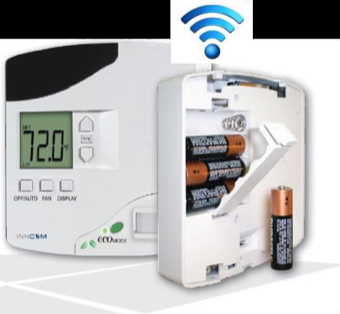
Walk the guestroom floors of enough Canadian hotels and you'll meet both members of INNCOM's e-Series family. The e528 is the wired one — five relays behind the faceplate, harnessed straight into the fan coil. The e529 looks nearly identical on the wall, but pop it off its plate and you'll find a battery compartment and no load wiring at all. It's the wireless member of the family, and it exists for one reason — buildings where pulling new wire to every thermostat location is impractical, disruptive, or flat-out impossible.
That design choice changes how you install it, troubleshoot it, and what "the room is offline" actually means. Howe Sound Solutions is a Canadian Honeywell INNCOM Authorized Service Integrator (ASI), and this guide is written from field experience, not from the manual — for manual-level detail, you'll want your property's as-built documentation or an ASI on the phone.
Where the e529 sits in the e-Series family
INNCOM's e-Series smart digital thermostats are more than temperature controls — each is a hub for guestroom automation, able to run virtually any fan coil unit, heat pump, or PTAC found in hospitality, and to act as the in-room brain of an energy management system (EMS). The family splits along one line:
- e528 (and its e527 relative): wired. Powered from the HVAC circuit — low-voltage or line-voltage variants — with built-in relays that switch the fan and valves directly. The typical choice for new construction and gut renovations.
- e529: wireless and battery-powered. Runs on four AA batteries and communicates over RF. Designed for existing properties where rewiring the thermostat location isn't practicable — which describes a great many older Canadian hotels, motels, and lodges with plaster walls, concrete block, or heritage constraints.
One practical consequence follows from the battery: AA cells can't switch fan and valve loads, and there's no load wiring at the wall anyway. In a typical e529 installation the thermostat is the sensor and guest interface, and the switching happens at the equipment side, commanded over the air. Keep that split in mind — a "thermostat problem" can live at the wall, at the equipment, or in the radio link between them.
Beyond power and wiring, the siblings share the family DNA: backlit LCD, precision DDC control, optional PIR occupancy sensor, optional humidity sensor, outside temperature display, and the ecoMODE green button. Both integrate natively with INNCOM's INNcontrol EMS software, and both can act as an in-room IoT hub — relaying balcony door, minibar, safe, and smoke detector status to the head end.
What RF operation actually means on site
The e-Series radio operates in the 2.4 GHz band using the IEEE 802.15.4 protocol — the low-power mesh-networking foundation used across building automation — on channels 11 through 26, with AES-128 encryption and a published indoor range on the order of 70 to 100-plus feet. Real-world range depends on construction: a poured-concrete downtown tower eats RF very differently than a wood-frame Whistler lodge.
Wireless changes the job in a few concrete ways:
Installation is faster and far less invasive. No fishing wire, no opening walls, no electrician per room. For occupied, revenue-generating properties, that's usually the whole business case.
The network becomes part of the HVAC system. A wired e528 talks to the property over RS485/CINET; if comms fail, the room still heats and cools. On an e529, RF is how the thermostat reaches the equipment controller and the property network. Room gateways, RF channel plans, and PAN identity become things a chief engineer needs to know exist, even if an ASI manages them.
2.4 GHz is a shared neighbourhood. Guest Wi-Fi lives there too. A Wi-Fi refresh or a wall of new access points can change the interference picture on a floor overnight. When RF symptoms appear right after an IT project, that's the first theory to test, not the last.
Batteries become a maintenance line item. A small one, but it belongs on the preventive maintenance calendar rather than in the "discover it from a guest complaint" column.
Pairing and binding, at the concept level
Every e529 has to know three things: which radio channel and network (PAN) it belongs to, which room it is (its network address, typically aligned to the room number), and which equipment it commands. Getting a replacement unit talking again means getting those identities right — what technicians usually call pairing or binding.
The actual key sequences and parameter entries are proprietary technician-level procedures that vary by system generation, so I won't reproduce them here — consult your INNCOM documentation or an Authorized Service Integrator. What matters for diagnosis is the concept: a physically healthy e529 with the wrong channel, PAN, or address is indistinguishable from a dead one as far as INNcontrol is concerned. Before condemning hardware, ask whether the room's radio identity could have changed — a swapped stat never re-addressed, a gateway replacement, or RF plan changes on the floor.
How occupancy-based energy management behaves
The e529 runs the same occupancy logic that makes the e-Series worth installing. Using its PIR motion sensor plus door switch or door-lock integration, it distinguishes three room states: occupied with someone present, rented but temporarily empty, and unrented. When the guest steps out, temperature drifts within a programmable setback band around their setpoint — small savings, invisible to comfort. Rooms unoccupied or unrented longer get a broader setback band via INNcontrol, and seasonal hibernation modes go wider still.
Two field notes. First, most "possessed thermostat" complaints — setpoints snapping back, temperature drifting after the guest leaves for dinner — are this system working as designed. Second, the sensors are the occupancy system: a blocked PIR lens or a sticking door switch quietly turns a comfort feature into a complaint generator. Check the inputs before blaming the logic.
Common field symptoms on the e529
Room offline in INNcontrol
The classic wireless complaint. Triage by asking who else dropped:
- One room offline, stat working locally: suspect that room — batteries first, then radio identity (channel/PAN/address), then the unit itself.
- A cluster of rooms offline together: suspect shared infrastructure — the gateway or floor-level device serving that zone, or new RF interference. Don't start swapping thermostats.
- Whole floors or the property stale at once: head-end or backbone problem. The stats keep doing their local job; you've lost visibility, not control.
Pairing and binding problems
Show up as a replacement unit that never appears at the head end, or a stat that reads temperature but doesn't drive the equipment. Almost always identity, not hardware: wrong channel, wrong PAN, an address that doesn't match the room list, or a binding step that never completed. If the property's room list and as-built RF plan have gone missing over the years, say so when you call for service — an ASI can rebuild from the system, but it changes the visit.
Battery and power questions
A battery-powered stat that goes dark or drops offline has an obvious first check, and it's genuinely the most common fix. Replace all four cells as a set with quality alkalines, log the date, and standardize replacement on a schedule instead of reacting room by room. A room that chews through batteries dramatically faster than its neighbours is a symptom worth investigating — a marginal RF link with constant retransmission, or a fault in the unit, can both present as battery drain.
Display issues
A blank display on an e529 means batteries until proven otherwise — there's no breaker to trip at the stat. Fresh cells, correctly oriented, and still dark usually means the unit has failed. A display that's dim, flickering, or showing garbage after water exposure (housekeeping mishaps happen) is generally a replace-the-unit situation, not a repair.
Temperature reading seems wrong
Mounting and environment first. The e-Series wants an interior partition wall at roughly chest height, away from sunlight, supply-air drafts, and heat sources, mounted flush and level. A stat beside a drafty balcony slider will faithfully report a temperature — just not the one the guest is feeling.
Replace or service?
A rough decision guide from the calls we run:
Lean toward simple service when the symptom is offline-but-working-locally (identity/network), battery-related, or behavioural (occupancy setback doing its job, sensor inputs stuck). Configuration and consumables, not hardware.
Lean toward replacement when the unit is dead with known-good batteries, the display or buttons have failed, the reading is wildly wrong with no environmental explanation, or the unit has taken water or impact damage. Swapping hardware is the quick part; the replacement still needs its radio identity and configuration set before the room is fixed.
Get an ASI involved when problems cluster across rooms, follow an IT or renovation project, or require service-level parameters and binding. Property-wide RF health is a system question, not a room question.
The Canadian angle
The e-Series carries CSA certification alongside its UL and FCC listings, so the family is at home in Canadian installations. More practically, Canadian properties are where the e529's retrofit story and the EMS setback economics land hardest: heating-dominated climates make unoccupied-room setback worth real money for more months of the year, seasonal resort wings benefit from hibernation modes, and older building stock — where rewiring is painful — is exactly what the e529 was designed for. The flip side of aggressive setback in a cold climate: rooms allowed to drift too cold risk frozen pipes and condensation, which is why setback bands and protection thresholds are commissioned deliberately at the head end, not improvised room by room.
Talk to Howe Sound Solutions
Howe Sound Solutions is a Canadian Honeywell INNCOM Authorized Service Integrator supporting hotels across the country. We work on e528 and e529 systems weekly — RF networks, room gateways, INNcontrol head ends, and the guestroom devices themselves — and we supply replacement INNCOM parts with compatibility verification before shipping, so the stat that arrives actually matches your system. One stubborn room, a floor that dropped offline after a Wi-Fi upgrade, or a property-wide EMS health check: contact us, and bring room numbers, what the displays show, what INNcontrol shows, and what changed recently.
FAQ
What's the difference between the INNCOM e528 and e529?
Same e-Series family, same display, sensors, and EMS capabilities. The e528 is wired — powered from the HVAC circuit with built-in relays that switch the fan coil directly. The e529 is battery-powered (four AA cells) and communicates wirelessly, designed for existing buildings where running new thermostat wiring isn't practical.
Why is my e529 room showing offline in INNcontrol?
Check batteries first — the most common cause and the cheapest fix. If the stat is alive but still offline, suspect radio identity (RF channel, PAN, or network address) or the gateway serving that zone. If several nearby rooms dropped together, look at shared infrastructure and recent RF-environment changes, not the individual thermostats.
How do I pair or bind a replacement e529?
The concept: the new unit needs the correct RF channel and network identity, the room's network address, and binding to the equipment it controls. The procedures are technician-level and generation-specific — consult your INNCOM documentation or an Authorized Service Integrator rather than internet folklore. A mis-bound stat can look fine on the wall while doing nothing useful.
How long do the batteries last, and what should I use?
Battery life varies with configuration, traffic, and RF conditions — treat it as a property-specific number you learn and schedule around. Use quality alkalines, replace all four as a set, and log the dates. A room that drains batteries much faster than its neighbours deserves investigation, not just re-feeding.
Can new guest Wi-Fi interfere with INNCOM wireless thermostats?
It can. The e-Series RF operates in the 2.4 GHz band (IEEE 802.15.4, channels 11–26), which overlaps 2.4 GHz Wi-Fi. If offline rooms appeared right after an access-point rollout, coordinate your Wi-Fi channel plan with your INNCOM RF plan — an ASI can help deconflict the two.
Why does the thermostat change temperature by itself when the room is empty?
That's the energy management system working as intended: when the PIR and door inputs say a rented room is temporarily empty, temperature drifts within a programmed setback band, with wider setbacks for unrented rooms and off-season hibernation. If it happens while a guest is present, check the PIR lens and door contact — a blocked sensor is the usual culprit.
Related: e528 replacement & repair · parts catalogue · customer platform · contact us